
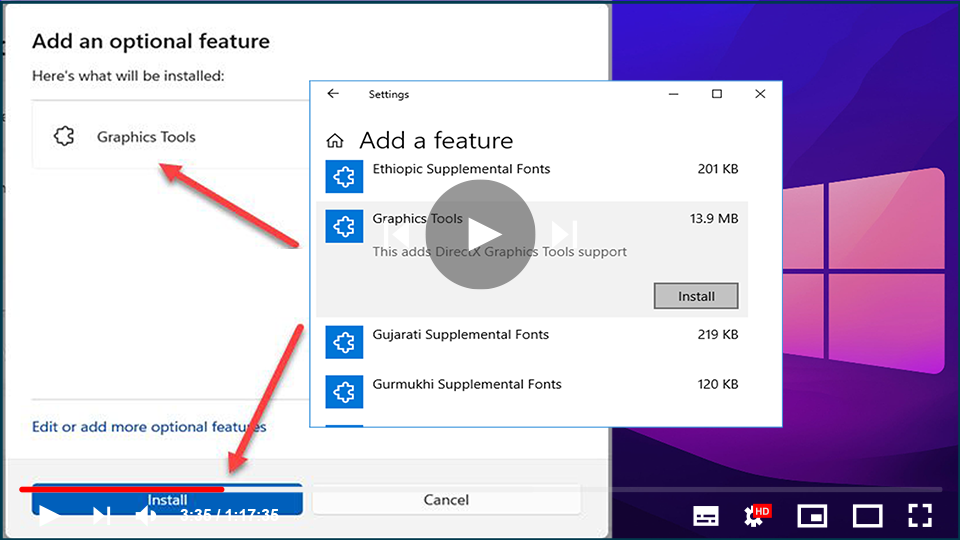

Several new features have been added to the feature stack in Windows 11/10
that were not available in previous versions of Windows. One such
functionality is the ability to install Graphics Tools as an additional
feature to the operating system. These features aren’t included with the
shipped-in product, but they’re simple to add if you want them. It’s
important to remember that these features are optional, and their absence
has no impact on your system.
that were not available in previous versions of Windows. One such
functionality is the ability to install Graphics Tools as an additional
feature to the operating system. These features aren’t included with the
shipped-in product, but they’re simple to add if you want them. It’s
important to remember that these features are optional, and their absence
has no impact on your system.
What are Graphic Tools?
To develop DirectX apps or games, Graphics Tools can be used to take
advantage of the graphics diagnostic features provided by the runtime and
Visual Studio. It also allows you to create a Direct3D debug device (via
Direct3D SDK Layers) in the DirectX runtime, plus Graphics Debugging, Frame
Analysis, and GPU Usage.
advantage of the graphics diagnostic features provided by the runtime and
Visual Studio. It also allows you to create a Direct3D debug device (via
Direct3D SDK Layers) in the DirectX runtime, plus Graphics Debugging, Frame
Analysis, and GPU Usage.
(adsbygoogle = window.adsbygoogle || []).push({});
There may be times when you only need a few graphic tools, like for
instance in the following scenarios:
01. Writing API traces in scripts or performing regression testing on a
lab machine
02. Installing D3D SDK Layers
03. Using the DXCAP command-line tool to capture and playback the D3D
graphics log file
Windows 10 Graphics Tools can be extremely useful in these situations.
Install or Uninstall Graphics Tools in Windows 10
1. Press Windows Key + I key combination on the keyboard to open the
Settings & click on System.

2. In the System Settings, click on Apps & features present in
the left pane.

3. Right-side pane, click on Manage optional features.
4. Manage Optional Features window, Press on Add a feature.

(adsbygoogle = window.adsbygoogle || []).push({});
5. Look for Graphics Tools & click on it.

Now, click the Install button to onboard the feature to your PC.
You can easily uninstall Graphics Tools from the Manage Optional
Features window if you wish to do so, by pressing the Uninstall
button.
What is the use of DirectX graphics tools?
DxDiag or better known as DirectX Diagnostic Tool is a tool that
helps us in identifying problems that are related to audio,
display, video, and any other multimedia applications with
required features running on our computer.

