


Privacy is a far more serious concern than most people realize. Personal data could be used to steal your identity & your money. It could also allow malicious people to track you or your loved ones and find opportune moments to do harm. Or on a simple level, it could be used to publicize information you just do not want to be public. In an age where giving up your private info grants you access to some very helpful services & apps, it can seem impossible to protect that data. It is possible though. We’ve compiled a list of key services & apps that help you do just that.
If You are Not Paying, You are The Product! Which is somewhat true, since Windows 10 is a free upgrade for Windows 7 and 8 users, Microsoft needs to find a way to generate income, thus the best way to do that is to monitor the behavior of the users – anonymously. Since Windows has a large installation pool base, tracking which domain is popular means making the Bing search engine better. Since Microsoft is forbidden by law to track a person personally, these data are collected anonymously, thus no harm allowing them to do so. Possible problems when using these tools.
01. Destroy Windows 10 Spying (DWS)

This apps extra Feature
* Open and edit the host’s file
* Restore your system
* Delete all windows 10 metro apps
* Delete one drive
* Enable UAC and Disable
* Disable Windows Update and Enable
* Remove all old firewall rules Fix screen rotate
This is a fairly basic program that allows users to enable a wide range of privacy settings in one simple interface, rather than having to dig around through Windows 10’s settings.
Download;

02. DoNotSpy 10

We have covered DoNotSpy10 before here on BGR, and it’s one of the most comprehensive options out there for taking control of your privacy in Windows 10. There’s a caveat, though: It is freeware, but it installs Open Candy software on the PC, which will display ads automatically in other applications.
Download:
03. Windows 10 Privacy Fixer
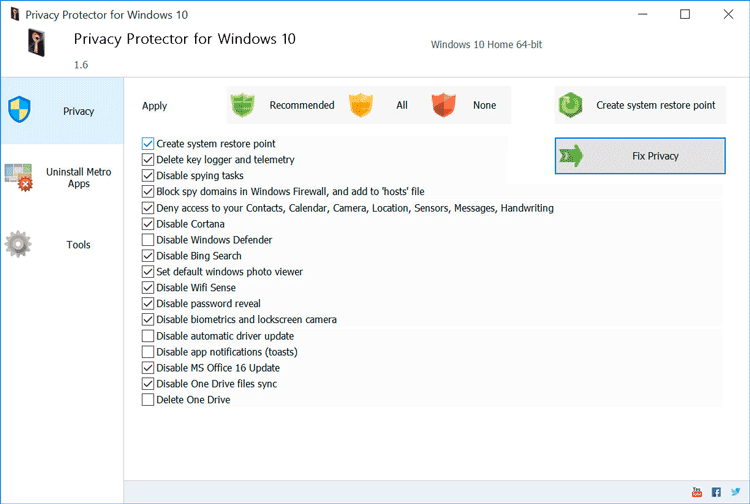
This application offers one tidy screen that lets you import your current privacy settings & then disable whichever features you want.
Download:

