


Fortnite is a battle royale shooting game in which the goal is to
survive as long as possible. It’s undeniably one of the most popular games
available, but many people still complain about being unable to play
normally.
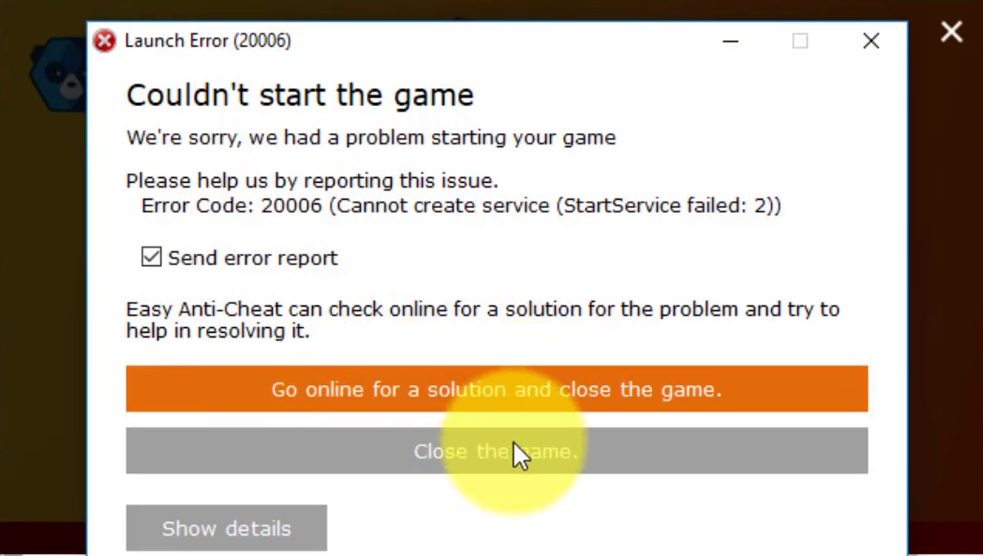
When you launch the game, the Fortnite error code 20006 appears. This is
a launcher error, and the executable for the game does not even start. The
message that follows says, “Couldn’t start the game. Error code: 20006
(“Cannot create service (StartService failed: 193)” The issue is usually
caused by the game’s EasyAntiCheat tool. To solve the problem, use the
methods listed below!
a launcher error, and the executable for the game does not even start. The
message that follows says, “Couldn’t start the game. Error code: 20006
(“Cannot create service (StartService failed: 193)” The issue is usually
caused by the game’s EasyAntiCheat tool. To solve the problem, use the
methods listed below!
What Causes Fortnite Error Code 20006?
The most common cause of Fortnite Error Code 20006 is a missing
EasyAntiCheat service on your computer, or by the service being broken,
out of date, or simply unresponsive when you first launch the game. Epic
Games does not want you to enter the game if you have not been checked
for cheating and hacking.
EasyAntiCheat service on your computer, or by the service being broken,
out of date, or simply unresponsive when you first launch the game. Epic
Games does not want you to enter the game if you have not been checked
for cheating and hacking.
Also, some of your game files may have become corrupt or missing, which
can be easily remedied by verifying the game from within the Fortnite
launcher. Corrupt files can trick the game into thinking you have a
cheat when you don’t.
can be easily remedied by verifying the game from within the Fortnite
launcher. Corrupt files can trick the game into thinking you have a
cheat when you don’t.
Repair the EasyAntiCheat Service
(adsbygoogle = window.adsbygoogle || []).push({});
This is the Anti-Cheat service that the game employs to identify cheaters
and hackers. It actively scans your setup for anything that could give you
an unfair advantage over your opponents. However, this service is
occasionally broken, and you may need to repair it yourself in order to
remove the Fortnite error code 20006.
and hackers. It actively scans your setup for anything that could give you
an unfair advantage over your opponents. However, this service is
occasionally broken, and you may need to repair it yourself in order to
remove the Fortnite error code 20006.
01. You can search for the game’s main executable by clicking the Start
menu button or the search button next to it and typing Fortnite. In any
case, right-click on the executable and select Open file location from
the context menu that appears.
menu button or the search button next to it and typing Fortnite. In any
case, right-click on the executable and select Open file location from
the context menu that appears.
02. The default folder for the installation is C >> Program Files
>> Epic Games >> Fortnite but it depends on your computer’s
architecture as well. You can also search for Fortnite after clicking
the Start menu or the search button, right-click the first entry, and
choosing Open File Location.
>> Epic Games >> Fortnite but it depends on your computer’s
architecture as well. You can also search for Fortnite after clicking
the Start menu or the search button, right-click the first entry, and
choosing Open File Location.
03. Either way, once you are inside the Fortnite folder, navigate to
FortniteGame >> Binaries >> Win64 (or Win32 depending on
your OS) >> EasyAntiCheat. Inside you should see the
EasyAntiCheat_Setup.exe file.
FortniteGame >> Binaries >> Win64 (or Win32 depending on
your OS) >> EasyAntiCheat. Inside you should see the
EasyAntiCheat_Setup.exe file.
04. Right-click the “EasyAntiCheat_setup.exe” file in the folder and
choose the Run as administrator option from the context menu which will
appear.
choose the Run as administrator option from the context menu which will
appear.
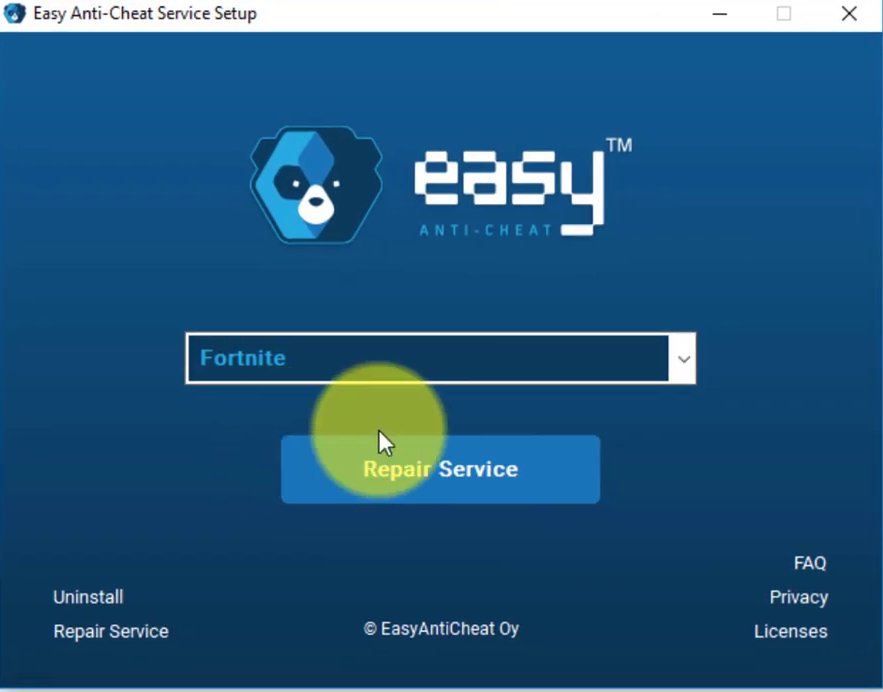
05. Confirm any UAC prompts that the file wants to make changes to your
computer and wait for its window to open.
computer and wait for its window to open.
06. Make sure Fortnite is selected from the games list and click the
Repair Service button below. The message “Installed Successfully” should
appear shortly after, so try relaunching the game and seeing if the
Fornite error code 20006 still appears!
Repair Service button below. The message “Installed Successfully” should
appear shortly after, so try relaunching the game and seeing if the
Fornite error code 20006 still appears!

