
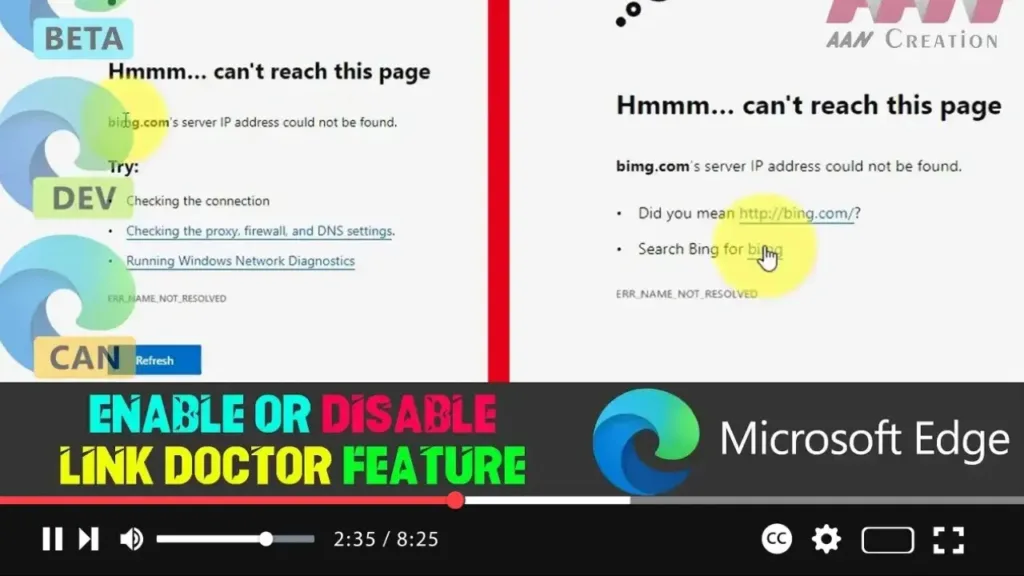

The Link Doctor feature in Microsoft Edge Chromium is a helpful tool designed to correct mistyped URLs automatically. For instance, if you accidentally type “bimg.com” instead of “bing.com,” Link Doctor will suggest the correct URL, helping you reach the intended website without the hassle of manually correcting the mistake. This feature enhances browsing efficiency, ensuring that minor typos don’t lead to unnecessary errors or confusion.
Steps to Enable or Disable the Link Doctor Feature
Step 1: Open Microsoft Edge
- Start by launching the Microsoft Edge browser on your computer.
Step 2: Access the Settings Menu
- Click on the three-dot menu button, located at the top-right corner of the browser window.
- From the drop-down menu that appears, select Settings.
.webp)
Step 3: Navigate to Privacy and Services
- In the Settings menu, look for the Privacy, search, and services tab on the left side of the screen and click on it.
Step 4: Enable or Disable Link Doctor
- Scroll down to find the Services section within the Privacy, search, and services tab.
- Locate the option labeled Suggest similar sites when a website can’t be found.
- To enable Link Doctor, toggle the switch next to this option to the “On” position.
- To disable Link Doctor, toggle the switch to the “Off” position.
.webp)
Step 5: Apply and Close
- After making your selection, simply close the Settings tab.
- The changes will be applied immediately, and the Link Doctor feature will either start or stop suggesting corrections for mistyped URLs, depending on your choice.
Additional Information
Link Doctor can be particularly beneficial for users who frequently make typographical errors when entering web addresses. By suggesting the correct URL, it saves time and reduces the frustration of dealing with error pages. However, for users who prefer to type URLs manually or who may not want suggestions, disabling this feature is straightforward.
Moreover, this feature aligns with Microsoft’s broader efforts to enhance user experience by integrating smart tools within their browsers. By making web browsing more intuitive and user-friendly, features like Link Doctor contribute to a more seamless online experience.

