

Customizing your Windows 10 experience with themes can enhance your computer’s aesthetic and reflect your personal style. Themes consist of wallpapers, colors, and sounds, providing a cohesive look for your desktop. Here’s how to download free themes for Windows 10.
Step 01: Access Windows Settings
- Click on the Start button.
- Select Settings (the gear icon).
Step 02: Navigate to Personalization
- In the Settings window, click on Personalization.
- Select Themes from the left sidebar.
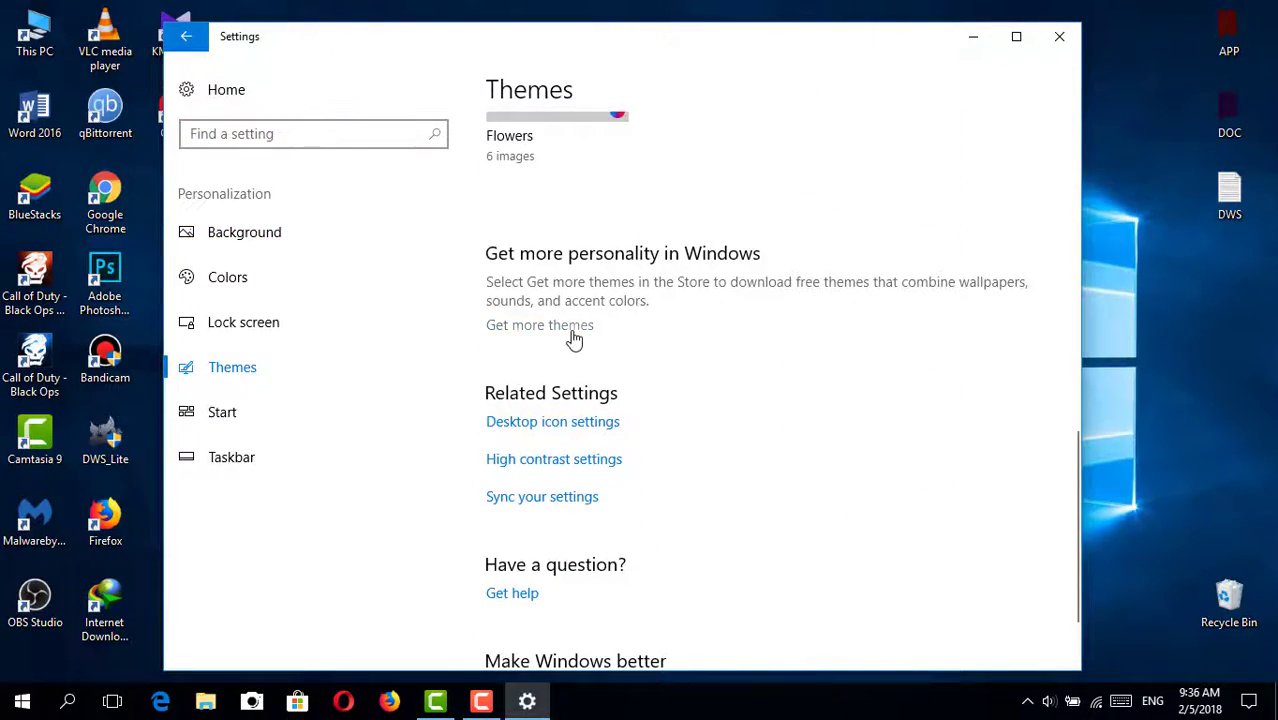
Step 03: Explore Available Themes
- In the Themes section, you’ll see your current theme and options for others.
- Click on Get more themes in Microsoft Store to browse the available free themes.
(adsbygoogle = window.adsbygoogle || []).push({});
Step 04: Download a Theme
- Browse through the themes available in the Microsoft Store.
- Click on a theme you like to view its details.
- Click the Get or Download button to install the theme.
Step 05: Apply the Theme
- After downloading, return to the Themes section in the Settings window.
- Under Apply a theme, select the newly downloaded theme to apply it to your desktop.
Additional Options for Themes
You can also download themes from third-party websites. Here’s how:

(adsbygoogle = window.adsbygoogle || []).push({});
Step 01: Search for Free Themes
- Use your preferred web browser to search for “free Windows 10 themes.”
- Look for reputable websites offering themes compatible with Windows 10.
Step 02: Download and Install
- Choose a theme that appeals to you and follow the website’s instructions to download it.
- Most themes will come in a compressed file format (like ZIP). Extract the files.
- Locate the theme file, right-click it, and select Apply to set it as your current theme.
Conclusion
Downloading and applying themes in Windows 10 is a straightforward process that allows you to personalize your computer effortlessly. Whether you choose to use the Microsoft Store or third-party websites, themes can help create a visually appealing and enjoyable workspace. Enjoy customizing your desktop to reflect your style and mood!

