

Microsoft Edge Chromium has received a new feature. A new site’s permission can be enabled to block mixed (typically insecure HTTP) content on a website you browse. The feature can also be globally enabled for all websites in Settings.
the new flag that enables the “Insecure content” site permission option in Settings. When enabled, it makes sure that only secure HTTPS content is allowed on websites you browse. This can be individually changed per website, or configured globally for all websites.
edge new flag that enables the “Insecure content” site permission option in Settings.
When enabled it makes sure that only secure HTTPS content is allowed on websites you browse. This can be individually changed per website, or configured globally for all websites.
01. Open Microsoft Edge.
02. Type the following path in the address bar and hit Enter.
edge://flags/#mixed-content-setting
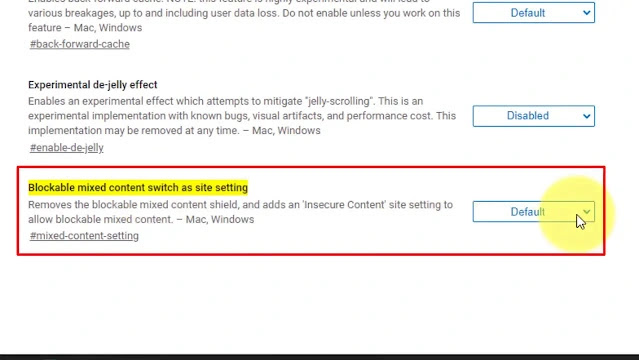
03. Enable the flag Blockable mixed content switch as the site setting.
04. Restart the browser.
01. Open the desired website in Edge Chromium.
02. Click on the site information (padlock) icon in the address bar.

03. Click on Site permissions. and In the list of permissions, find Insecure content and set it to Block mixed content (it is the default setting). Select Allow to unblock it and have page elements loaded via the plain HTTP.
01. Go to settings
02. Click the Site Permissions.
03. Click on the option of Insecure content.

04. On the next page, check out the list of websites under the Block and Allow sections.

