

There are several reasons why you might want to find out what your MAC
address is: Perhaps you’re configuring a router and want to exclude
certain devices from your network for added security. Maybe your router
lists connected devices by MAC address and you want to figure out which
one is which. Alternatively, you may need to know your PC’s MAC address to
diagnose or resolve some computer network errors.
address is: Perhaps you’re configuring a router and want to exclude
certain devices from your network for added security. Maybe your router
lists connected devices by MAC address and you want to figure out which
one is which. Alternatively, you may need to know your PC’s MAC address to
diagnose or resolve some computer network errors.
What is a MAC address?
A MAC address is an alphanumeric hardware identifier that is unique to
each device that connects to the internet. A MAC (or “media access
control”) address is assigned to each network device or interface, such
as your laptop’s Wi-Fi adapter.
each device that connects to the internet. A MAC (or “media access
control”) address is assigned to each network device or interface, such
as your laptop’s Wi-Fi adapter.
(adsbygoogle = window.adsbygoogle || []).push({});
A MAC address is assigned by manufacturers and embedded in the device’s
network interface card; it is permanently linked to the device and
cannot be changed.
network interface card; it is permanently linked to the device and
cannot be changed.
The MAC address is composed of 12 digits divided into six pairs
(00:1A:C2:7B:00:47, for example).
(00:1A:C2:7B:00:47, for example).
To communicate with other local network devices, your device must have a
MAC address. In order to establish a connection, your device broadcasts
its MAC address when it detects a router. Your router will assign you an
IP address so that you can connect to the internet, and this is where
the IP address comes in.
MAC address. In order to establish a connection, your device broadcasts
its MAC address when it detects a router. Your router will assign you an
IP address so that you can connect to the internet, and this is where
the IP address comes in.
What exactly separates a MAC address from an IP address, then? MAC
addresses are partially permanently burned into your device, whereas IP
addresses can change depending on where you are. MAC addresses are used
on a local network, whereas IP addresses can be used to identify network
devices all over the world.
addresses are partially permanently burned into your device, whereas IP
addresses can change depending on where you are. MAC addresses are used
on a local network, whereas IP addresses can be used to identify network
devices all over the world.
How to Use Command Prompt to Find Your MAC Address in Windows
10
10
Using the command prompt is the quickest way to discover the MAC
address.
address.
1. Open the command prompt. Search “Command Prompt” in the taskbar,
or if you have an older version of Windows, you can right-click on
the Start button and select Command Prompt from the menu.
or if you have an older version of Windows, you can right-click on
the Start button and select Command Prompt from the menu.
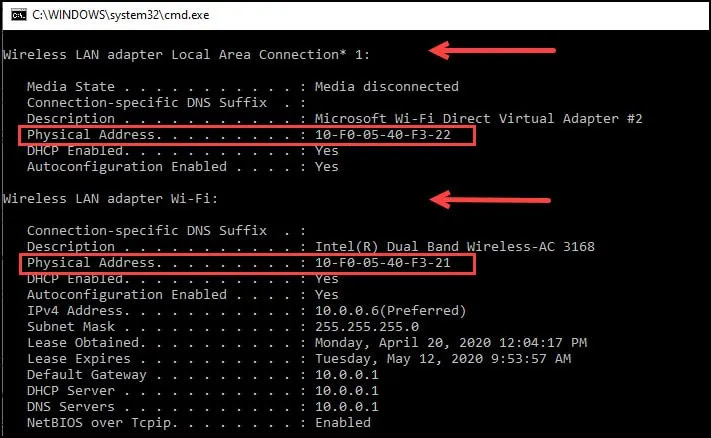
2. Type in ipconfig /all and press Enter. This will display your
network configuration.
network configuration.

3. Find your adapter’s physical address. Look for the values next
to “Physical Address,” which is your MAC address, as you scroll down
to your network adapter.
to “Physical Address,” which is your MAC address, as you scroll down
to your network adapter.

