


The Tor browser is one of the best privacy solutions for anonymous
web browsing. The Onion Router (its full name) routes your traffic through
at least three Tor relays (servers) located around the world. This makes
tracing your data traffic back to you nearly impossible, greatly
increasing your privacy. Of course, it’s also the primary access point to
the dark web.
In this article, we will explain how to download and install Tor on
different devices and OS. Furthermore, we will go over how to use Tor
safely to maximize your anonymity online.
different devices and OS. Furthermore, we will go over how to use Tor
safely to maximize your anonymity online.
Installing Tor on Windows
01. Go to the Tor Project’s website and select the Tor browser
download option.
download option.
02. You’ll find yourself on the download page. To download the
Windows installation file, click the first icon on the left. Select
“Download in another language or platform” if you want to download the
browser in a different language or platform. You will be able to
download the Tor browser in one of 35 different languages as a result
of this.
Windows installation file, click the first icon on the left. Select
“Download in another language or platform” if you want to download the
browser in a different language or platform. You will be able to
download the Tor browser in one of 35 different languages as a result
of this.

(adsbygoogle = window.adsbygoogle || []).push({});
03. Your computer will be downloaded with a file. When you open this
file, the process begins and the Tor browser is installed. Choose your
preferred language, then press the “OK” button.
file, the process begins and the Tor browser is installed. Choose your
preferred language, then press the “OK” button.

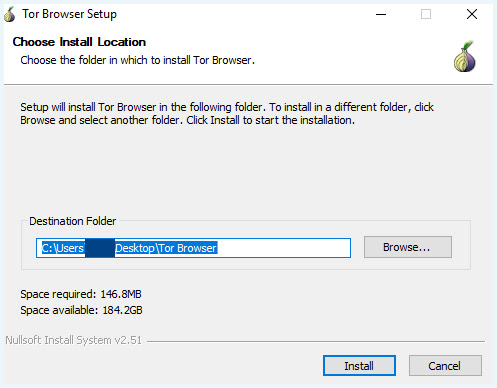
04. The Browser Setup will appear. Choose the destination folder (you
usually don’t need to change anything here because the installer will
create a new folder for it) and click “Install.”
usually don’t need to change anything here because the installer will
create a new folder for it) and click “Install.”
05. Tor can be set to start automatically once you’ve finished
installing it during the installation process. If you don’t, you’ll
have to open it yourself by searching for the program.
installing it during the installation process. If you don’t, you’ll
have to open it yourself by searching for the program.

