

Windows 10 does not natively support live wallpapers, but with a third-party tool like DesktopHut, you can easily set a video as your desktop’s animated background. This tool is fantastic for customizing your desktop with a moving, dynamic background. The steps are simple, and the tool is portable, meaning it doesn’t require installation and can be used directly after downloading.
Step 01: Download DesktopHut
To start, you’ll need to download DesktopHut from this link: Download DesktopHut. It’s a free tool, compatible with Windows, Linux, and macOS.
Step 02: Run DesktopHut
Once downloaded, launch the tool. It will open directly without the need for installation. The interface is easy to navigate, and you can start using it right away.
Step 03: Select a Video File
Click the Browse button to choose a video file from your computer. This video will serve as your live wallpaper. The tool supports various video formats, allowing you to select anything from personal videos to animated wallpapers.
Step 04: Enable Live Wallpaper
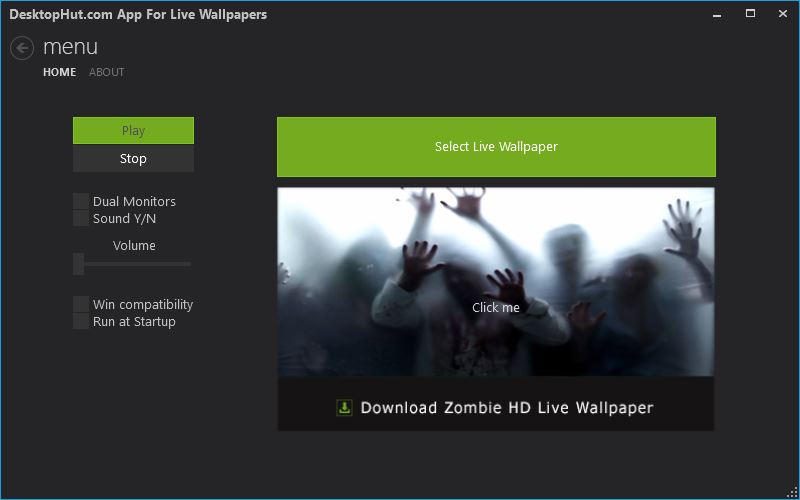
Once the video file is selected, click the Play button, and the video will immediately start playing on your desktop as your live wallpaper.
Step 05: Additional Settings
DesktopHut offers multiple customization options:
- Dual Monitor Mode: If you have two monitors connected, you can enable dual monitor mode to play live wallpapers on both screens.
- Sound Options: You can enable or disable sound from the video and adjust the volume. This is handy if you want ambient music or sound effects to accompany the live wallpaper.
Resource Usage
Playing a live wallpaper can consume some system resources, but DesktopHut ensures that it only uses what’s necessary. This helps keep your system running smoothly even with an animated desktop.
Final Thoughts
With DesktopHut, you can turn any video into a vibrant, live desktop background. Whether it’s for entertainment, aesthetic appeal, or productivity, this tool gives you a great way to customize your Windows 10 experience.
If you want to take it a step further, you can also explore various pre-made live wallpapers available online or create your own videos for a truly unique setup.

