
Sometimes you turn off Wi-Fi on purpose: to save battery, to stop distractions, or while travelling. The problem is remembering to turn it back on. Windows has a small timer option that switches Wi-Fi back on automatically, so you don’t miss messages or updates later.
Schedule Wi-Fi to turn back on (Windows 11)
- Open Settings (Windows + I).
- Go to Network & internet > Wi-Fi.
- Switch the Wi-Fi toggle to Off.
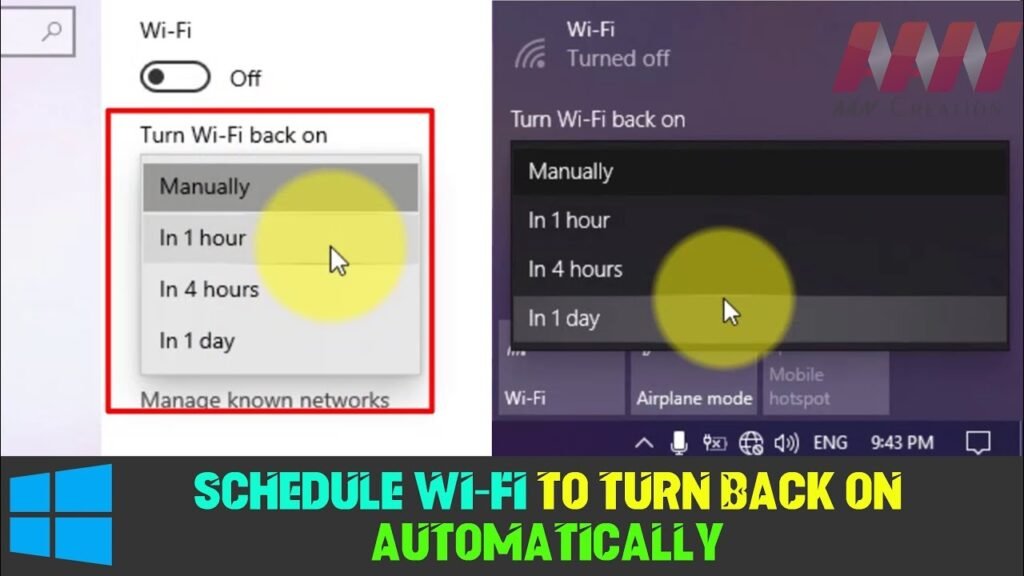
- A new option appears below it: Turn on Wi-Fi automatically. Open the drop-down.
- Choose In 1 hour, In 4 hours or In 1 day. Choose Manually if you want it to stay off until you turn it on yourself.
Wi-Fi turns back on after the time you picked and reconnects to your known networks.
Windows 10 steps
- Open Settings > Network & Internet > Wi-Fi.
- Turn Wi-Fi off.
- Under Turn Wi-Fi back on, pick a time from the list.
Turn Wi-Fi back on yourself
- Press Windows + A to open Quick Settings and click the Wi-Fi button.
- Or go back to Settings > Network & internet > Wi-Fi and switch it on.
- If your keyboard has a Wi-Fi or airplane key, that works too.
Airplane mode works differently
The timer only appears when you turn off Wi-Fi itself. If you use Airplane mode, all wireless connections stay off until you turn Airplane mode off again. For a short break from the internet, turning off just Wi-Fi with a timer is usually more convenient.
If Wi-Fi doesn’t come back on
- Check Airplane mode: make sure it isn’t turned on in Quick Settings.
- Restart the adapter: in Settings > Network & internet > Advanced network settings, disable and enable your Wi-Fi adapter.
- Update the driver: check Windows Update > Advanced options > Optional updates or your laptop maker’s support site.
Frequently asked questions
Does the timer keep counting if the laptop goes to sleep?
Wi-Fi turns on when the time has passed and the PC is awake. If the laptop was asleep, Wi-Fi comes back once you wake it, if the time is already up.
Can I pick a custom time, like 30 minutes?
No. Windows only offers the fixed choices in the list.