
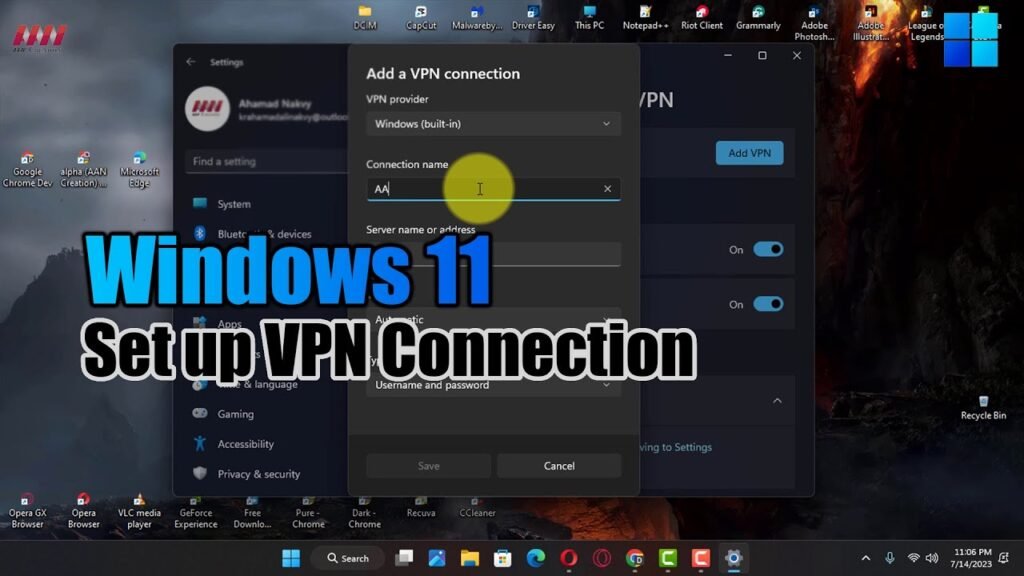

Many VPN services and workplaces give you a server address and login details instead of an app. Windows 11 has a built-in VPN client that can connect using these details. It supports common protocols such as IKEv2, L2TP/IPsec and SSTP.
What you need first
- The server name or address, for example vpn.example.com.
- The VPN type (protocol) your provider uses.
- Your username and password, and a pre-shared key or certificate if your provider requires one.
Your VPN provider or IT department supplies these details. Note that the free built-in client doesn’t include a VPN service; you still need a server to connect to.
Add the VPN connection
- Open Settings > Network & internet > VPN.
- Click Add VPN.
- Set VPN provider to Windows (built-in).
- Type a Connection name you’ll recognise, such as “Work VPN”.
- Enter the Server name or address.
- Choose the VPN type, for example IKEv2 or L2TP/IPsec with pre-shared key. If you’re not sure, Automatic tries the options for you.
- Choose the Type of sign-in info, usually User name and password, and enter your details.
- Click Save.
Connect and disconnect
- Go to Settings > Network & internet > VPN and click Connect next to your VPN.
- Or press Windows + A to open Quick Settings and click the VPN tile. If you don’t see it, click the pencil icon and add it.
- To disconnect, click Disconnect in the same place.
If it won’t connect
- Double-check the server address, VPN type and pre-shared key. One wrong character stops the connection.
- Try a different network. Some public Wi-Fi blocks VPN traffic.
- Click your VPN in Settings, open Advanced options and edit the connection properties to fix typos.
- Ask your provider whether they use a protocol Windows supports, such as IKEv2. OpenVPN and WireGuard need the provider’s own app.
Frequently asked questions
Is the built-in VPN client free?
Yes. The client is part of Windows 11. You only pay for the VPN service itself, if your provider charges for it.
Which VPN type is best?
IKEv2 is usually fast and secure. Avoid PPTP if possible, as it uses outdated security.
