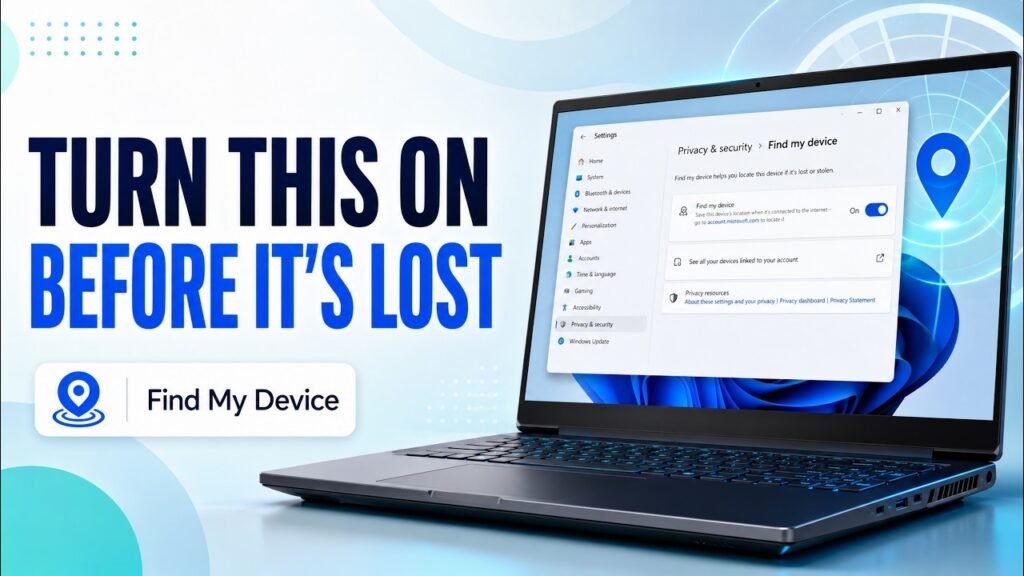

If your laptop is lost or stolen, Find My Device can show its last known location on a map and let you lock it from another computer or phone. The catch: it only works if you turn it on before the laptop goes missing. It takes about a minute.
What you need
- A Microsoft account signed in on the PC (a local account won’t work).
- An administrator account on the PC to change the setting.
- Location services turned on, so Windows can report where the device is.
How to turn on Find My Device
- Open Settings (Windows + I).
- Go to Privacy & security > Find my device.
- Turn on the Find my device toggle.
- If Windows says location is off, go to Privacy & security > Location and turn on Location services.
On Windows 10 the setting is in Settings > Update & Security > Find my device, and it works the same way.
How to find your laptop if it goes missing
- On any other device, open a browser and go to account.microsoft.com/devices.
- Sign in with the same Microsoft account used on the lost laptop.
- Find the laptop in the list and choose Find my device.
- A map shows the last location Windows reported, with the time it was recorded.
- Click Lock to sign out all users and show a custom message on the lock screen, for example a phone number to call.
Tips to improve your chances
- Set a PIN or password: without one, anyone can use the laptop.
- Turn on encryption: use Settings > Privacy & security > Device encryption (or BitLocker on Pro editions) so your files can’t be read if the drive is removed.
- Write down the serial number: police and insurance companies usually ask for it.
- Don’t confront a thief: if the map shows a location, give it to the police instead.
Frequently asked questions
Does Find My Device work when the laptop is turned off?
No. The laptop must be on and connected to the internet to send a new location. While it’s off, you only see the last location it reported.
Can I erase my laptop remotely with Find My Device?
For personal Microsoft accounts, Find My Device offers locate and lock, not a remote wipe. Remote wipe is available for work or school PCs managed by an organisation through tools like Microsoft Intune.