
Hardware acceleration lets Microsoft Edge use your graphics card to draw pages and play videos, which normally makes browsing smoother. But with some graphics drivers it causes problems, such as flickering, black or green video, blurry text or tabs that crash. Turning it off is a quick test that often fixes these issues.
How to turn off hardware acceleration
- Open Edge and click the three-dot menu at the top-right.
- Click Settings.
- Click System and performance in the left menu.
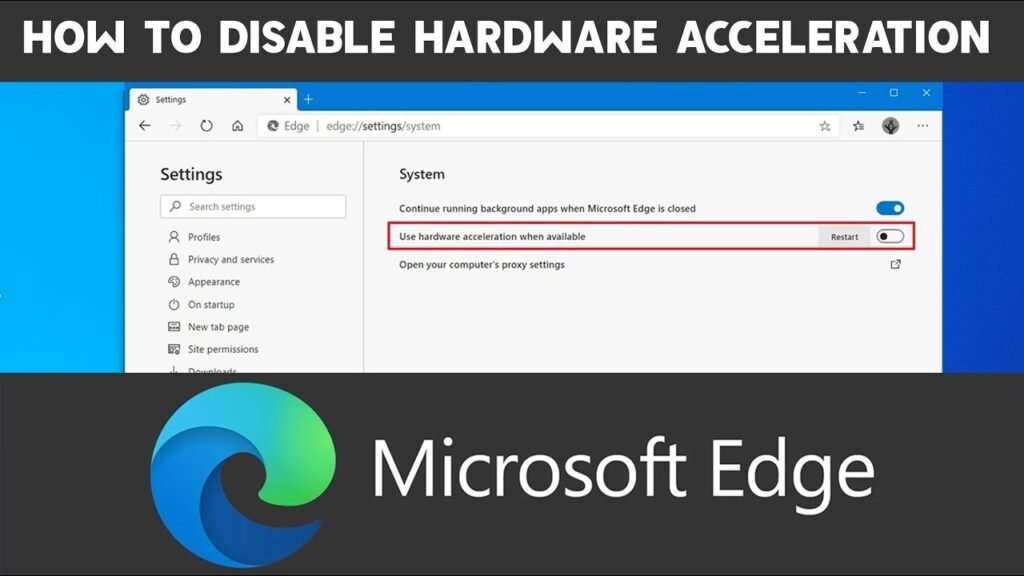
- Turn off Use graphics acceleration when available. On older versions it’s called Use hardware acceleration when available.
- Click the Restart button that appears to restart Edge.
Edge reopens your tabs. Check whether the problem is gone.
Check the result
Type edge://gpu in the address bar and press Enter. The Graphics Feature Status section shows which features are now handled by software instead of the graphics card.
When you should turn it back on
Without hardware acceleration, Edge uses more processor power. You may notice:
- Higher CPU use and a warmer laptop when watching videos.
- Shorter battery life.
- Choppy playback of 4K or high-frame-rate videos.
If these appear, update your graphics driver, then turn the setting back on and see if the original problem is fixed.
Fix the real cause: update graphics drivers
- Go to Settings > Windows Update > Advanced options > Optional updates and install any display driver updates.
- Or download the latest driver from your graphics maker (Intel, AMD or NVIDIA) or your laptop maker’s support site.
- Restart the PC and test Edge with hardware acceleration on again.
Useful tips
- Also check Settings > System and performance for efficiency mode, which can reduce video quality on battery.
- If only one site misbehaves, try it in an InPrivate window (Ctrl + Shift + N) to rule out extensions.
- Chrome has the same setting under Settings > System.
Frequently asked questions
Will turning off hardware acceleration make Edge slower?
For normal web pages you’ll barely notice. Video, games in the browser and heavy web apps may be less smooth.
Why is the setting greyed out?
On work or school PCs, it may be controlled by your organisation’s policy. Ask your IT team.