
When you plug in a USB drive, phone or memory card, Windows may show a pop-up asking what to do, or open a folder or app automatically. This is AutoPlay. Older versions of Windows also had AutoRun, which could start programs from a drive by itself and was abused by malware. Modern Windows no longer runs programs from USB drives automatically, but you can still control AutoPlay.
Turn AutoPlay on or off in Windows 11
- Press Windows + I to open Settings.
- Go to Bluetooth & devices > AutoPlay.
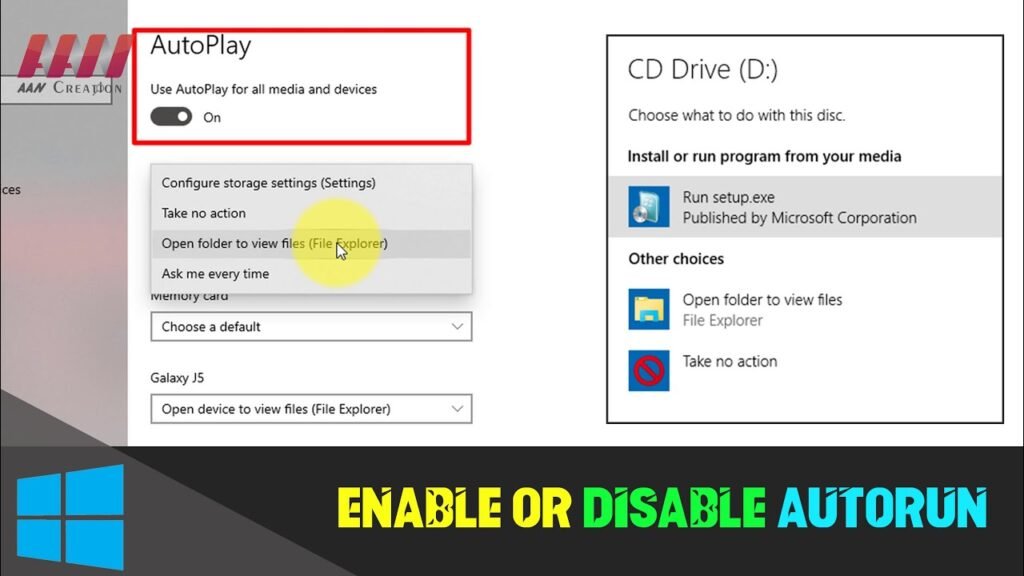
- Use the Use AutoPlay for all media and devices toggle to turn it on or off.
Turn AutoPlay on or off in Windows 10
- Open Settings > Devices > AutoPlay.
- Switch Use AutoPlay for all media and devices on or off.
Choose a default action for each device type
If you keep AutoPlay on, you can decide exactly what happens. On the same AutoPlay page:
- Under Removable drive, choose an action such as Open folder to view files (File Explorer), Take no action or Ask me every time.
- Under Memory card, choose an action such as importing photos or opening the folder.
- Connected phones and cameras may also appear here with their own options.
For the best security, choose Ask me every time or Take no action for removable drives.
More options in Control Panel
For CDs, DVDs and other media types, open the classic settings:
- Press Windows + R, type
controland press Enter. - Go to Hardware and Sound > AutoPlay.
- Set an action for each media type, then click Save.
Click Reset all defaults at the bottom of this page to undo your choices.
Useful tips
- Hold Shift while inserting a disc to skip AutoPlay once, on PCs that still have a disc drive.
- Even with AutoPlay off, Microsoft Defender scans files when you open them. You can also right-click a drive in File Explorer and scan it manually.
- On work PCs, AutoPlay may be controlled by your organisation.
Frequently asked questions
What’s the difference between AutoPlay and AutoRun?
AutoRun could launch a program from a drive automatically. Windows has blocked this for USB drives for years. AutoPlay only asks or performs the action you’ve chosen, such as opening a folder.
Is it safer to turn AutoPlay off?
It reduces surprises and accidental clicks on unknown drives. It’s a good idea if you often plug in drives from other people.